Welcome to
Church Growth Plugin.
Know Your Impact. Discover how people find your church on Google and explore new opportunities to reach more people online.
For selected beta participants with a WordPress website and a personal invitation.
Install. Connect. Discover.
You don’t need to be an SEO expert to start understanding your church’s Google Search visibility.
-
Install the plugin
Upload it to your church’s WordPress website. -
Enter your invitation
Use the personal beta code sent to you. -
Connect Google
Authorize your church’s Search Console access. -
Explore your insights
Discover your available search performance and content opportunities.
Download Church Growth Plugin.
Start by downloading the WordPress plugin ZIP file to your computer. You’ll upload this file directly into your church’s WordPress dashboard.
Church Growth Plugin Beta
WordPress installation package for selected beta participants.
Keep the downloaded ZIP file intact. Do not unzip it before uploading it through WordPress.
Four Simple Steps to Know Your Impact.
Follow these instructions after receiving your personal invitation code.
Download the Plugin
Download the Church Growth Plugin ZIP file from the section above. Save it somewhere you can find it on your computer.
You do not need to open or extract the ZIP file.
Install It on WordPress
Log into your church’s WordPress administrator dashboard.
Select the downloaded ZIP, click Install Now, then click Activate Plugin.
Enter Your Invitation Code
Open Church Growth Plugin from your WordPress dashboard.
Find the Invitation-only beta section and enter the personal code from your welcome email.
Your code is intended for one WordPress website. Keep it private.
Connect Google Search Console
Follow the Google authorization instructions displayed in the plugin.
Choose a Google account that has access to your church’s Search Console property, review the requested read-only permission, and continue.
Once connected, return to Church Growth Plugin to explore your available dashboard insights.
Discover How People Find Your Church.
Church Growth Plugin turns available Google Search Console information into a simpler view of your church’s online visibility.
Search Performance
Review impressions, clicks, click-through rate, and average position from your church’s Google Search Console property.
Keywords to Watch
Explore available search queries connected to your website and identify topics worth watching.
Blog Opportunities
Discover up to five content opportunities based on the search information Google has returned for your church.
A Real Look Inside Church Growth Plugin.
See how Google Search performance, keywords, and content opportunities come together in one WordPress dashboard.
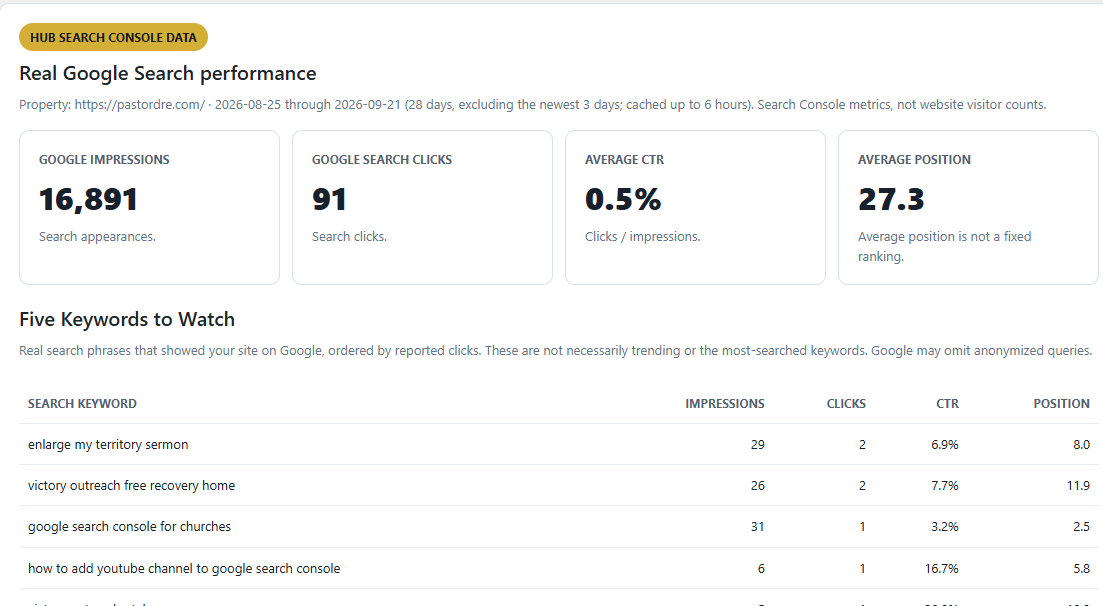
Actual dashboard example from PastorDre.com. Your church’s results will depend on the Search Console information Google has available for your website.
Your Google Account. Your Church’s Insights.
Church Growth Plugin uses Google Search Console’s read-only authorization to retrieve available search performance information.
You authorize access through Google. You should never give e-Church Digital your Google password.
Learn more about how e-Church Digital handles plugin connections and data in our Privacy Policy and Terms of Service .
Important Beta Information
Church Growth Plugin is currently being tested with a limited group of invited participants.
Some features, messages, or connection processes may change as we improve the product.
If you encounter a problem, please contact e-Church Digital so we can investigate it.
A paid consultation is not required to install or use your beta invitation.
Need Help Getting Connected?
Having trouble installing the plugin, entering your invitation code, or connecting Google? Send our team a message and tell us which step you’re on.
Contact Beta Support →Installation and connection support is separate from our optional paid Church Growth Consultation. Please do not email passwords, invitation codes, or Google tokens.
Before You Get Started.
Do I need a WordPress website?
Yes. This beta plugin is installed through the WordPress administrator dashboard. You need permission to install plugins on your church’s website.
Where do I get my invitation code?
Your personal invitation code is sent separately by e-Church Digital after your church is selected for the beta. It is not displayed on this page.
Which Google account should I use?
Use a Google account that has access to the Search Console property for the church website you are connecting.
What if I don’t have Google Search Console set up?
You’ll need to set up and verify your church’s website in Google Search Console before the plugin can retrieve that property’s search performance information.
What if my invitation expires?
Contact e-Church Digital before trying to register again. We can review your beta invitation status and help determine the next step.
What if Google shows no performance data?
Google may not have returned performance rows for the selected reporting period. Your dashboard can still be connected correctly. Church Growth Plugin will not invent traffic or keywords.
Do I have to book a paid consultation?
No. The Live Church Growth Consultation is an optional, separately priced service. It is not required to use Church Growth Plugin.
Get Found. Reach More People. Know Your Impact.
We’re excited to have your church help shape this new tool. Let’s discover what your Google Search insights can reveal about your online visibility.
Start Your Beta Setup →